
A client’s ecommerce site had 340 broken URLs. Some had been dead for over a year. Twelve of those pages had backlinks from high-authority sites, just sitting there, pointing to nothing. All that link equity, gone.
That’s what 404 error code seo services usually start with. Not some dramatic site penalty. Just slow, quiet damage that builds up while nobody’s watching.
Every broken link on your site is doing three things: wasting your crawl budget, throwing away backlink value that took months or years to build, and bouncing visitors who came ready to buy. Google’s own documentation confirms that repeated 404s signal poor maintenance. And while John Mueller has said 404s are “normal,” he’s also clarified that broken internal links actively hurt your site’s performance.
The fix isn’t complicated. But you have to find the errors first.
What 404 Errors Actually Look Like When You Find Them
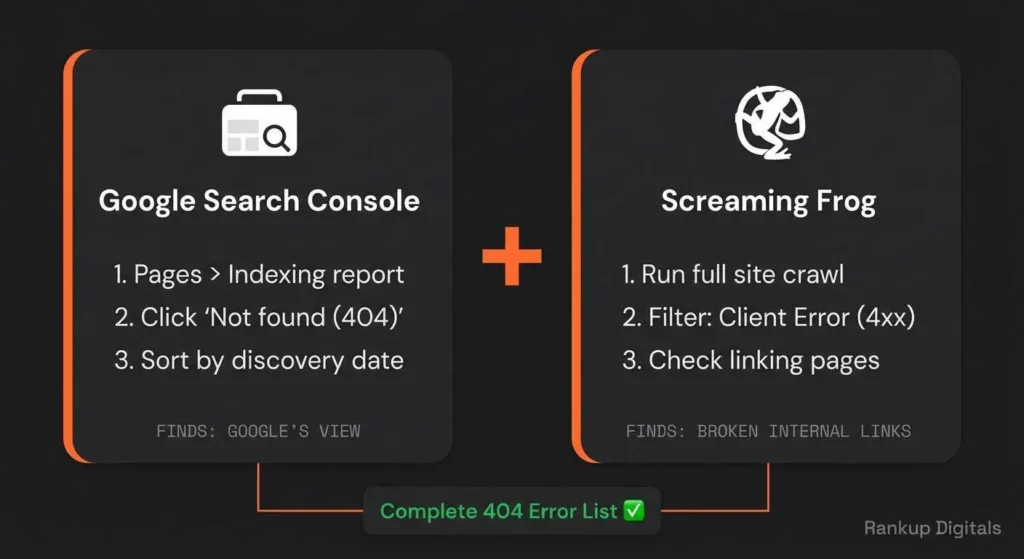
Open your Google Search Console right now. Pages > Indexing report > “Not found (404).” You’ll see a list. But that list alone doesn’t tell you what to do. Context matters.
Here’s what we typically run into.
The renamed URL nobody updated. A client changed their services page from /seo-packages to /seo-services. Clean URL, sure. But 14 internal links across their blog posts still pointed to the old one. Every visitor clicking those links hit a dead page. Fix took 20 minutes: one 301 redirect from old URL to new, then updated the internal links at the source.
The deleted blog post with backlinks. A SaaS company deleted 30 “outdated” blog posts during a site redesign. Nobody checked backlinks first. Nine posts had them. One from a DA 60+ publication. All that domain authority, pointing at nothing. We rebuilt the three strongest and 301-redirected the rest to closest topic matches.
The plugin-generated ghost URLs. A WordPress site had 200+ 404 errors that kept reappearing. A deactivated events plugin left behind hundreds of URLs in the sitemap. Google kept crawling pages that hadn’t existed for months. Fix: cleaned the XML sitemap, removed orphaned database entries. 404 list stopped growing within two weeks.
The backlink typo nobody noticed. Search Console showed traffic hitting /about-su instead of /about-us. An external directory linked with a typo. One redirect, 30 seconds, recovered about 15 visits per month.
Most 404 problems fall into one of these buckets. Knowing what you’re looking at is where it gets useful.
Not Every 404 Gets the Same Fix
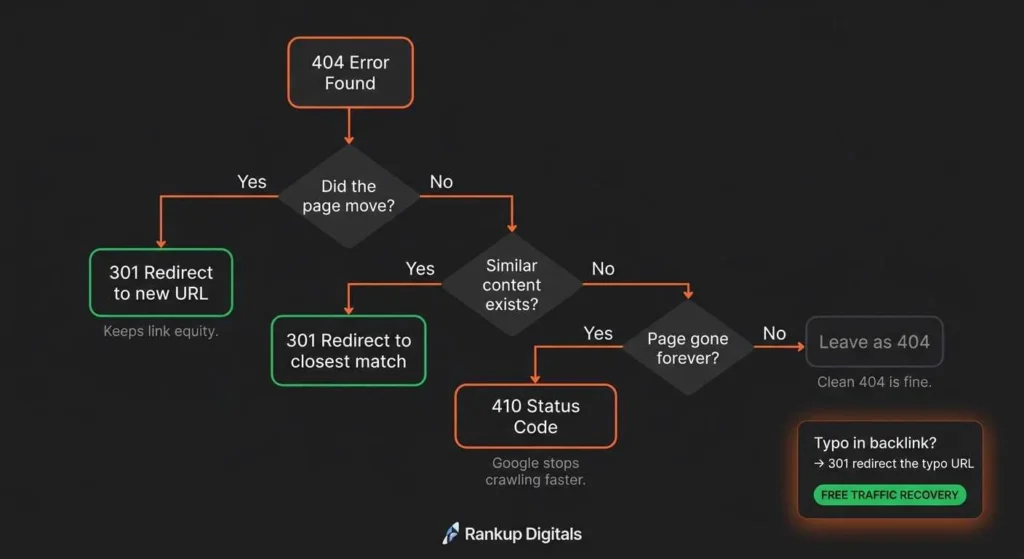
| Situation | Right Fix | Why |
| Page moved to a new URL | 301 redirect to the new URL | Preserves link equity, sends users to the right place |
| Page deleted, similar content exists | 301 redirect to the closest match | Keeps backlink value alive |
| Page deleted, nothing similar exists | Leave as 404 | A clean 404 is better than a misleading redirect |
| Page deleted permanently, never coming back | 410 status code | Tells Google to stop crawling it faster than a 404 |
| Typo in someone else’s backlink | 301 redirect the typo URL to the correct one | Captures traffic you’re losing for free |
That last one gets overlooked constantly. Check your Search Console 404 list for URLs that look almost right. “/sevices” instead of “/services.” “/about-su” instead of “/about-us.” Those are usually external sites linking to you with a typo. A quick 301 redirect recovers that traffic instantly.
On WordPress sites, setting up redirects is straightforward. Plugins like Redirection or Rank Math’s built-in redirect manager handle it without touching code. Just make sure you’re not creating redirect chains, where URL A redirects to B, and B redirects to C. That slows crawling and dilutes link equity at every hop.
The Soft 404 Problem Nobody Talks About
You fixed your hard 404s. Great. But open Search Console again and look for “Soft 404” in that same indexing report.
Soft 404 errors are harder to catch.The page loads fine, returns a 200 status code (which tells Google “everything’s good”), but the actual content is empty or useless. Google sees through it and flags it as a soft 404 anyway.
This happens a lot with:
- Tag and category pages in WordPress with zero posts assigned
- Search result pages that return “no results found”
- Product pages where the item was removed but the page shell remains
- Auto-generated URLs from plugins or themes
Soft 404s waste crawl budget because Google keeps recrawling them, thinking they should have content. Unlike hard 404s where Google eventually stops trying, soft 404s keep eating resources.
Empty category pages are the easiest, just noindex them or add real content. Product pages where the item’s gone? Return a proper 404 or 410 so Google stops crawling. And if Google flagged a live page as soft 404, the content’s probably too thin. Add substance until the page actually earns its spot.
When 15 Errors Become 150
Everything above works when you’re dealing with a manageable list. Twenty, thirty broken URLs. You sit down, sort them, redirect what needs redirecting, clean up the rest. Weekend project, maybe less.
But some sites aren’t that simple.
A law firm we audited had 400+ 404 errors across three years of blog posts that had been deleted, reorganized, and deleted again. Half had backlinks. Some had redirect chains four layers deep. Their crawl budget was being burned on URLs that hadn’t existed since 2021.
That’s not a plugin fix. That’s a proper technical SEO audit where someone maps every broken URL, checks backlink profiles, builds a redirect strategy that doesn’t create new problems, and cleans the XML sitemap so Google stops wasting time on dead pages.
If your Search Console 404 list keeps growing faster than you can fix it, or you’re seeing the same errors reappear after fixing them, or your organic traffic has been slowly dropping and you can’t figure out why, there’s usually a deeper technical issue underneath. Broken permalink structures, server misconfigurations, plugin conflicts generating phantom URLs.
Worth getting professional eyes on it before the damage compounds further.
FAQs
Do 404 errors directly hurt my Google rankings?
Not directly. Google treats them as normal. But the indirect damage, lost backlinks, wasted crawl budget, higher bounce rates, adds up fast on sites with dozens of broken URLs.
Should I redirect all 404s to my homepage?
No. Google has specifically said this hurts performance. Only redirect to a genuinely relevant page. If nothing relevant exists, a clean 404 is the better option.
How often should I check for 404 errors?
Monthly for most sites. Weekly if you’re regularly publishing, deleting, or restructuring content. Set up Screaming Frog scheduled crawls or check Search Console’s indexing report on a routine.
Do I need a custom 404 page?
Yes. A custom 404 page with your navigation, search bar, and links to popular pages keeps visitors on your site instead of bouncing. It won’t fix the SEO damage, but it stops the user experience bleed while you sort out redirects.
