
When a Google Ads campaign isn’t bringing enough leads, most people open the campaign settings first.
I get why. Bids, keywords, search terms, CPC, all of that looks like the obvious place to start. But plenty of times, the bigger issue is sitting outside the ad account. The visitor clicks, lands on the page, and nothing on that page makes the next step feel easy.
That’s why Google Ads landing page optimization should come before adding more budget.
A weak landing page doesn’t always look terrible. Sometimes it looks clean. The problem is usually smaller than that. The headline is too broad. The offer is buried. The form feels like work. The page talks about the company before it talks about the customer’s problem.
More budget won’t fix that.
Google Ads Landing Page Optimization Starts With Intent
The first check is not the button color.
It’s intent.
What did the person search? What did the ad promise? What did the landing page show them in the first few seconds?
If those three don’t feel connected, the page is already making the visitor adjust. That’s a bad place to start with paid traffic because every click has a cost attached to it.
Google also treats landing page experience as part of Quality Score, along with ad relevance and expected clickthrough rate. So this isn’t only a design preference. The page is part of the campaign.
For example, if someone clicks an ad for “emergency roof repair,” the page shouldn’t open like a full company profile. It should make roof repair obvious, show the service area, give trust proof, and make calling simple.
That’s the kind of page check we’d connect with an ad marketing campaign, because clicks alone don’t pay the business.
A Homepage Usually Has Too Many Jobs
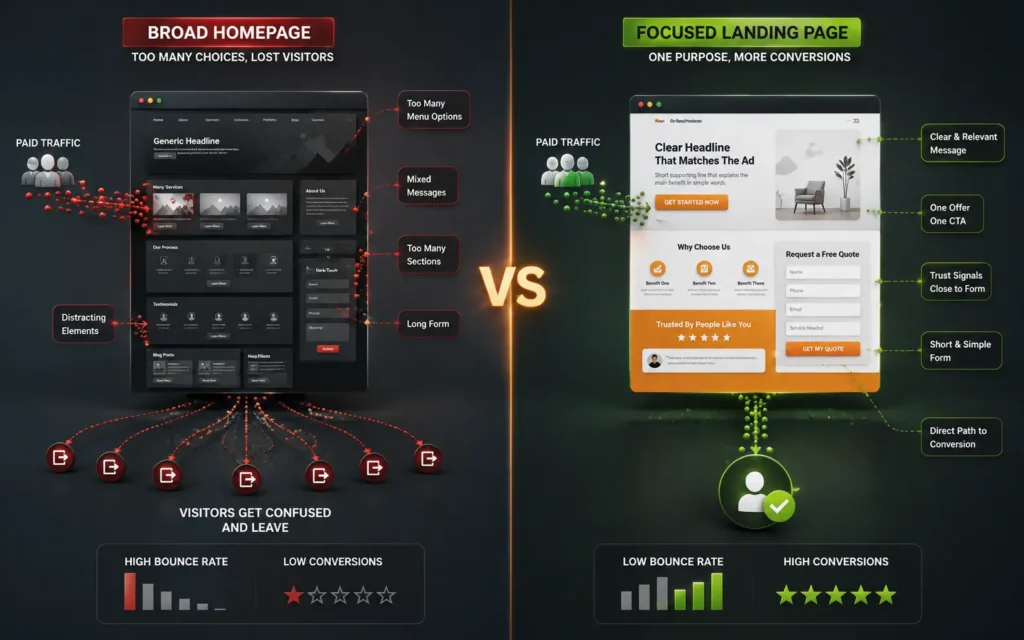
A homepage has to serve everyone.
Paid search traffic is not everyone.
Someone coming from an ad has already shown intent. They don’t need a full tour of the business. They need a clear reason to stay and a clear action to take.
For paid traffic, a focused landing page usually gives you a cleaner test. One service. One main offer. One main form or call button. Enough proof to remove doubt.
That’s not fancy. It’s just less distracting.
The Page Has to Match the Ad, Not Just the Brand
One mistake I see often is a landing page that sounds good for the business, but not for the searcher.
The ad might talk about “book more roofing jobs,” “get a fast website,” or “schedule a dental consultation.” Then the page opens with a broad agency-style headline that could fit any service.
That gap costs trust.
A landing page doesn’t need clever copy. It needs close copy. The headline, first paragraph, images, proof, and call to action should all stay near the reason someone clicked.
If the ad is about emergency service, the page should feel urgent. If the ad is about a high-ticket consultation, the page should feel careful and credible. If the ad is about local help, the city or service area should not be hidden near the bottom.
That’s where many paid campaigns lose people quietly.
Forms Can Kill Good Traffic
A lead form can look simple to the business and still feel annoying to the visitor.
Name, email, phone, company, budget, full message, service type, preferred time, how did you hear about us. That might be useful for the sales team, but it can be too much for someone still deciding.
For cold paid traffic, I usually prefer asking for less at the start. Get the enquiry first. You can qualify the lead after.
The same goes for call buttons. On mobile, the phone number should be easy to tap. Not hidden in the footer. Not inside a tiny header. Not placed after five scrolls of content.
Good landing pages don’t make people prove they’re serious before they can contact you.
Speed and Layout Still Matter
A slow page makes every paid click more fragile.
You don’t always need a full rebuild. Sometimes the issue is heavy images, too many scripts, bloated page builder sections, or a form plugin loading half the site for one field.
This is where clean WordPress development work helps. If the page is easier to edit, faster to load, and cleaner on mobile, testing becomes much less painful.
I wouldn’t chase perfect scores first. I’d fix what real visitors feel: slow load, jumpy layout, hard-to-read text, broken spacing, and buttons that don’t stand out.
Paid traffic is already expensive. The page shouldn’t make it harder
Track Leads, Not Just Visits

A landing page can look better after edits and still fail if tracking is weak.
For Google Ads, I’d want to know which clicks became calls, form submissions, booked appointments, quote requests, or real sales conversations. Page views don’t tell that story. Even form submissions can be misleading if half of them are junk.
This is where many small businesses get stuck. They know ads are spending money, but they don’t know which page, keyword, or offer produced the serious enquiry.
Basic tracking should answer a few simple questions:
- Did the visitor call?
- Did the form submit properly?
- Which campaign brought the lead?
- Was the lead worth following up?
- Did mobile users behave differently?
Without that, you’re guessing. And guessing with paid traffic gets expensive fast.
Fix the Page Before Feeding the Campaign
If a campaign already has enough clicks to show a pattern, I wouldn’t rush into more budget. I’d clean the page first.
Start with the obvious things: headline, offer, mobile layout, call button, form length, proof, page speed, and tracking. You don’t need to test twenty tiny changes before fixing the parts that are clearly hurting trust.
A good landing page doesn’t pressure people with loud copy. It makes the next step feel safe and simple.
For some businesses, that means a better service page. For others, it means a dedicated PPC landing page with fewer distractions. If the site itself is old, slow, or hard to edit, the landing page problem may turn into a business website design problem too.
The main point is simple enough: don’t pay for more attention until the page is ready to handle it.
More budget can help a working campaign grow. It can’t turn a confusing page into a good sales path.
If your Google Ads are getting clicks but not enough leads, look at the page before blaming the whole campaign.
FAQs
Should I send Google Ads traffic to my homepage?
Usually, no. A homepage is too broad for most paid search clicks. If someone clicks an ad for one service, send them to a page that talks about that service, shows proof, and gives one clear next step.
What makes a good Google Ads landing page?
A good landing page matches the ad, loads well on mobile, explains the offer clearly, shows trust proof, and makes the form or call button easy to use. It doesn’t need to be fancy. It needs to be clear.
Can landing page changes lower wasted ad spend?
Yes, in many cases. If the page is confusing, slow, or too broad, paid traffic can leave without contacting you. Fixing the page helps the same ad clicks work harder before you increase budget.
.
