
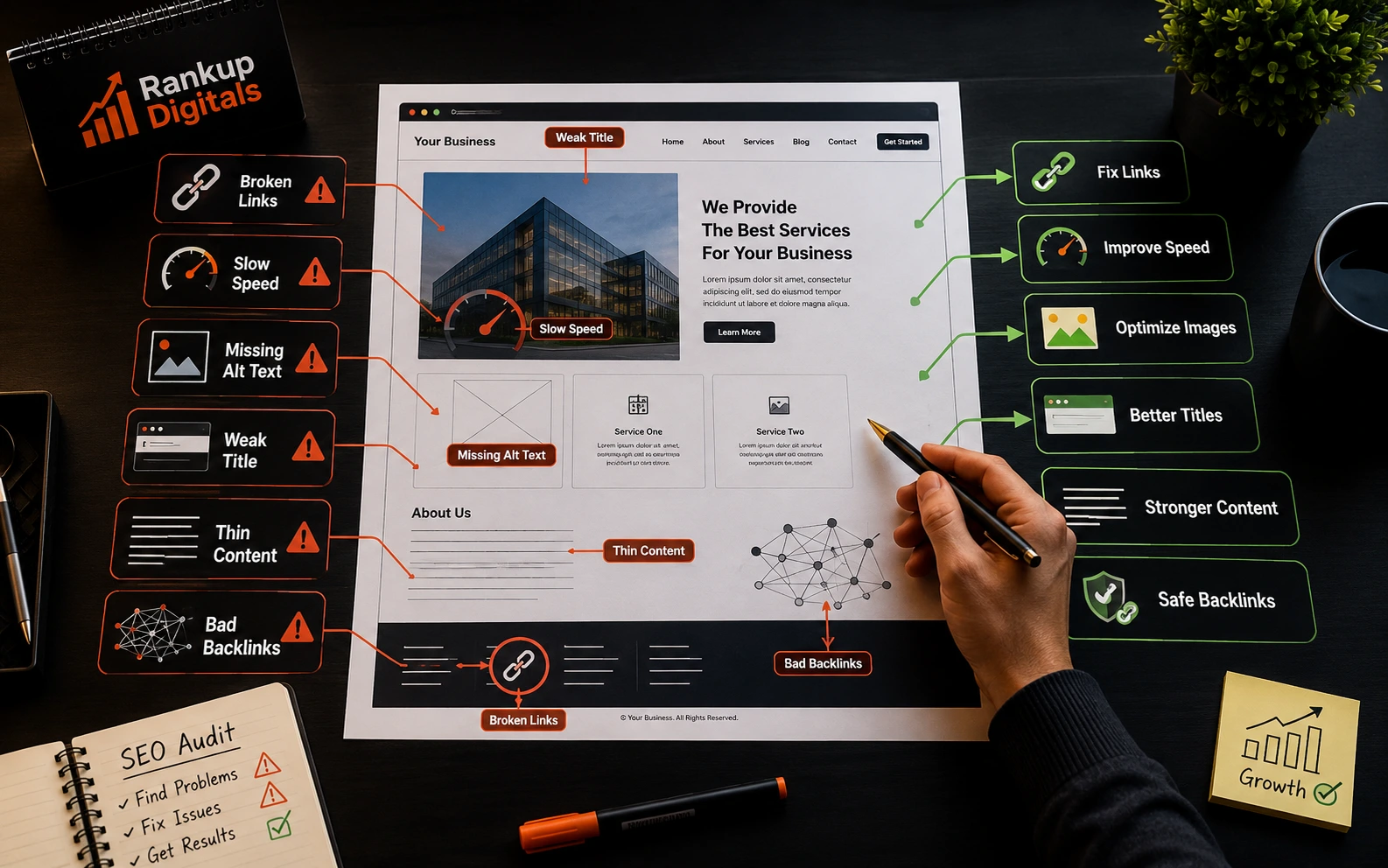
Site audits stopped surprising me long ago. Different industries, fine. WordPress, Shopify, custom builds, whatever. The mistakes themselves though? Same ones, repeating across every audit I’ve opened in the last five years.
You start expecting them after a while. The page that won’t rank has a junk title tag. The agency billing $5k a month has never logged into Search Console. The “lightweight” theme is shipping 4MB of unused JavaScript on every page load.
Below are the ten that keep showing up.
1. Writing content without matching search intent
The most expensive one on this list.
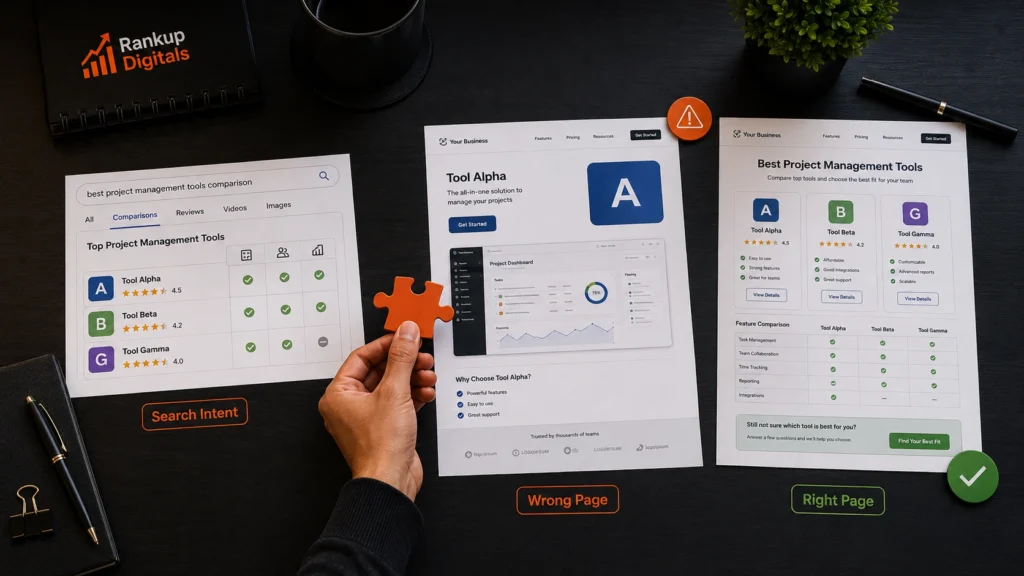
You pick a keyword with decent volume. Build a page around it. It gets indexed and either fails to rank or sits at position 38 without converting. Almost every time, intent is the cause.
Someone googling “best running shoes” wants comparison content. Someone googling “Nike Pegasus 41” wants product specs and a price. Same category, very different pages needed.
Before writing, check the top five ranking results. If they’re listicles and you’ve built a single-product page, intent’s off. Google’s getting sharper at this every year.
2. Thin content on pages that need to rank
Most business sites have a thin content problem and don’t realise it.
Service pages especially. Three paragraphs. Bullet list. CTA button. Maybe 280 words. Then the owner wonders why “WordPress development services” or “best clinic in Dubai” won’t move.
Word count isn’t everything, but a page needs depth Google can understand. Commercial pages usually need 800 words minimum. Informational ones often more.
The bigger issue is recycled templates. Location or service pages with one variable swapped get treated as near duplicates. Each page needs its own substance, not a find-and-replace job.
3. Weak meta titles and descriptions
Open Search Console for most business sites and you’ll find pages getting impressions but losing clicks. Nine times out of ten, metadata is the reason.
A weak title looks like “Home – Acme Corporation.” A strong one looks like “Custom Furniture Made in Houston Since 2007 | Acme.” Same business, completely different signals sent to both Google and the person deciding to click.
Meta descriptions don’t directly affect ranking. They shape click-through rate, which Google uses as a quality signal over time. Pages with generic descriptions bleed clicks to competitors with sharper copy. Google’s documentation on titles and descriptions is worth a re-read every year or two.
4. Broken internal linking
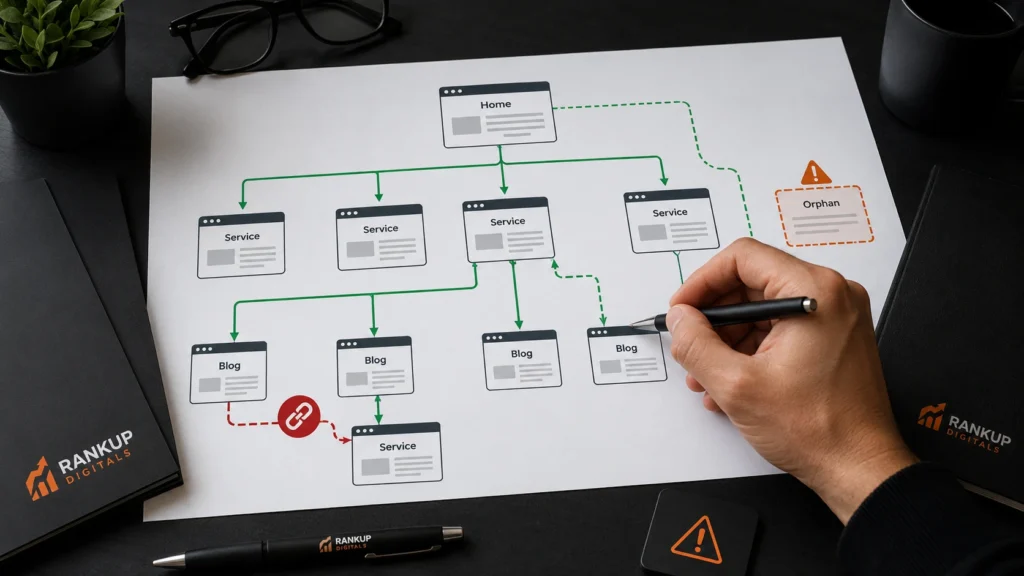
Internal links tell Google how your content fits together, and most business sites are a mess here.
Orphan pages with zero incoming links. Blog posts only linking to themselves. Service pages that ignore each other. Broken links rotting in old posts nobody’s touched.
A clean structure passes authority from your homepage to deeper pages. Screaming Frog can map yours in twenty minutes, or hire SEO services that include this kind of audit. Fix broken links first, then build connections between related pages.
5. Slow page speed and Core Web Vitals
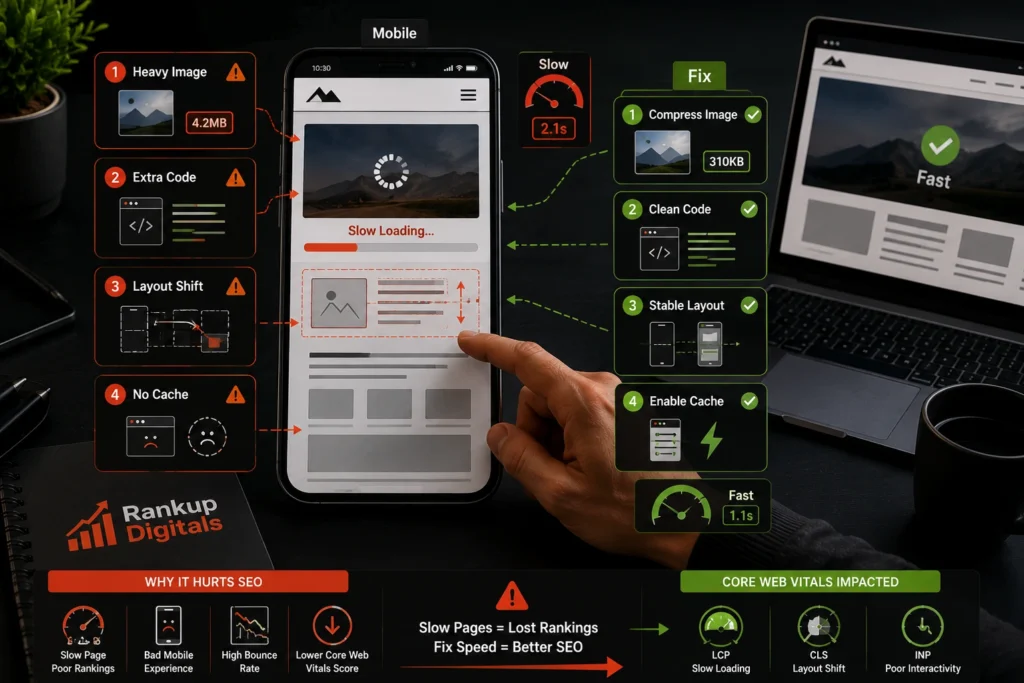
Most sites I audit fail at least one Core Web Vitals threshold on mobile.
Google measures three things now: LCP (how fast main content loads), INP (how fast the page responds), and CLS (how much layout shifts as it loads). Fail these on mobile, and competitive rankings slip.
Usual suspects: hero images uploaded at 5MB, render-blocking scripts, themes packed with unused CSS, missing caching. Test through Google PageSpeed Insights monthly. Red scores on mobile? That’s job one.
6. Ignoring Google Search Console
Plenty of businesses spend real money on SEO without ever opening Search Console.
It shows you queries you’re appearing for, queries getting impressions but no clicks, indexing issues page by page, and crawl errors Google finds in real time. Free tool. More reliable than any third-party SEO platform.
If you check one tool a week, make it this one. Look at impressions, click-through rate by page, and the coverage report. Skipping Search Console is the SEO equivalent of not checking your bank statements.
7. Keyword stuffing in body content
This one comes from old SEO advice nobody updated.
Someone learned in 2014 that repeating the focus keyword everywhere helped rankings. Headings. Meta description. Sentence after sentence. The result reads unnatural, and Google’s content quality systems catch it.
Modern ranking favours pages written for humans. Use your focus keyword two to four times naturally, then rely on related terms and semantic variations. If a sentence sounds awkward when read aloud, the keyword usage is too forced.
8. Bad URL structure
URLs on most CMS sites are ugly by default. You’ll see /?p=4527, URLs locked to outdated dates, slugs that are the full 12-word H1 copy-pasted. Clean URLs stay short, include the focus keyword, and use hyphens between words.
9. Missing alt text and image SEO
CMS uploads default to filenames like IMG_4271.jpg with blank alt text. Both matter. Alt text supports accessibility and gives Google another signal about what’s in the image. Rename files before upload. Write descriptive alt text. Compress images before serving.
10. Buying low-quality backlinks
This one comes up more than agencies admit.
Links from PBNs, link farms, unrelated directories from countries you don’t operate in, exact-match anchor text spammed across 80 placements. None of it helps rankings. Worst case, it earns a manual action. Google’s link spam policies spell out what to avoid. A junk backlink profile needs cleanup before any new outreach starts.
Final word
Work in order: technical fixes first, metadata second, content quality third, backlinks last. For small business SEO, Search Console setup and meta title rewrites on the top 20 pages usually give the biggest early wins. The start project page is the easiest place to begin if you want help.
FAQs
What’s the biggest SEO mistake businesses make?
Writing content without checking search intent. A perfectly written page still fails when it answers the wrong question.
How do I check if my site has SEO mistakes?
Start with Google Search Console. The coverage report and queries getting impressions but no clicks surface most of what a paid audit would find.
Can SEO mistakes be fixed without an expert?
A lot of them, yes. Titles, descriptions, alt text, Search Console setup, internal links. All DIY territory. Core Web Vitals work, schema, and serious migrations usually need professional help.
