

Ranking drop dekh kar sab se pehli galti ye hoti hai ke business owner content ko blame kar deta hai.
Title change karo. Paragraph add karo. Publish date update karo. Aur phir wait.
Kabhi kabhi content issue hota hai. Lekin many times problem page ke words mein nahi hoti. Problem hoti hai crawl, indexing, redirects, speed, internal links, ya kisi choti si setting mein jo update ke baad quietly change ho gayi.
That’s why technical SEO audit services matter when rankings suddenly fall. Before rewriting pages, we need to check whether Google can reach the right pages, index them, understand them, and trust the site structure.
Ranking drop ka pehla check content nahi hota
Main audit mein pehle page read nahi karti.
Pehle data dekhti hoon.
Search Console mein last 28 days ko previous 28 days se compare karo. Phir dekho drop kahan hai. Sirf impressions giri hain? Clicks bhi gire hain? Average position down hai? Sirf mobile par issue hai? Sirf ek page gira hai ya full site?
Ye difference important hai.
Agar impressions giri hain lekin position same hai, ho sakta hai search demand ya query mix badla ho. Agar position bhi down hai, then ranking issue real hai. Agar sirf 2 pages drop hue hain, un pages ko inspect karo. Agar full site down hai, technical change pehle check karo.
Google’s own traffic-drop guidance also treats technical issues, algorithm changes, reporting changes, and search demand as separate causes. So guessing is a bad habit.
What we check before touching the article
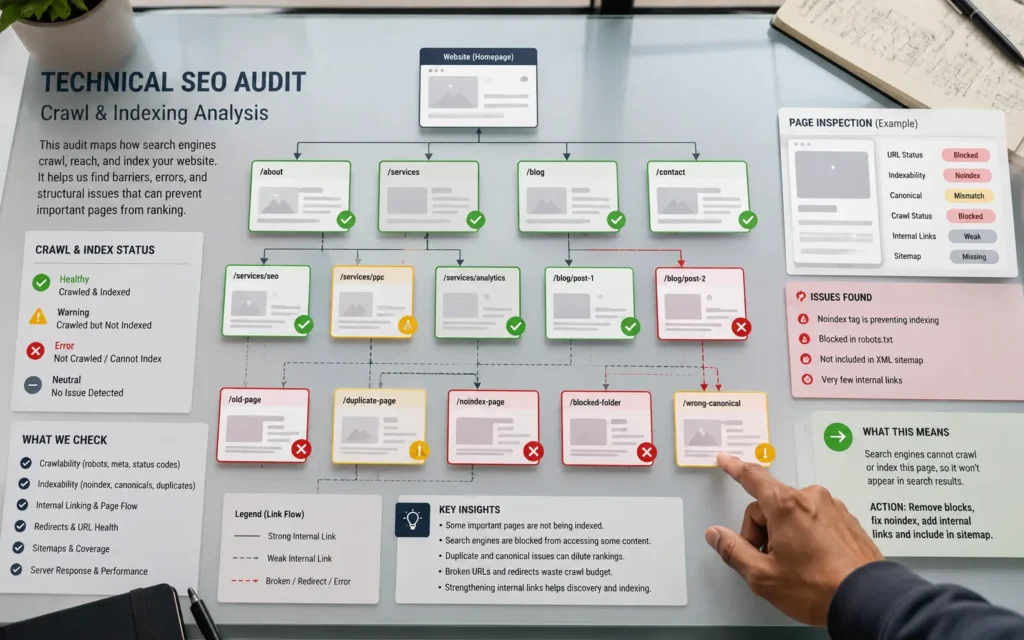
Technical audit ka simple purpose hai: pehle site ki plumbing check karo.
Can Google crawl the page?
Is the page indexable?
Is noindex accidentally added?
Is canonical tag correct?
Are old URLs throwing 404s?
Are redirects clean?
Is the sitemap updated?
Are important pages internally linked?
Is mobile speed hurting users?
This is where many sites quietly lose ground.
A page can look fine from the front end and still send weak signals to Google. I’ve seen service pages linked only from the footer, blog posts pointing to old URLs, and WordPress plugins adding messy canonical tags after updates.
Content may need work later.
But we don’t repaint the wall before checking the leak behind it.
What I check after the graph drops
After the drop is confirmed, I don’t scan the whole website blindly.
I pick the pages that lost the most. Usually it’s a service page, an old blog post that had steady impressions, or a page that used to bring enquiries. Then I compare that page against the queries it lost.
That tells me where to look first.
If the page is still indexed but position fell, I check content quality and competitors later. If Google isn’t indexing it properly, the issue is technical. If mobile dropped harder than desktop, speed and layout move up the list.
Google’s guide on debugging traffic drops is useful for this because it doesn’t treat every drop as the same problem.
The audit table I actually care about
A technical audit can become messy fast. So I keep the first pass tight.
| What changed? | Where I check | What it usually means |
| Page lost rankings | Search Console queries | The page may have lost relevance or stronger pages moved up |
| Page disappeared | URL Inspection Tool | Indexing, canonical, or noindex issue may be involved |
| Many URLs dropped | Sitemap, robots.txt, templates | A site-wide setting or crawl issue may have changed |
| Mobile fell harder | Page speed, layout, scripts | The page may be slow or hard to use on phones |
| Old pages show errors | 404s and redirects | Link signals may be going to dead or weak URLs |
| Service pages feel hidden | Internal links and menus | Google may not see those pages as important enough |
The URL Inspection Tool helps here because it shows what Google knows about a single URL. I use it when one page looks suspicious, not for every tiny page on the site.
Then the fix has to match the drop
This is where bad SEO work gets expensive.
If the issue is broken URLs, rewriting the article won’t help much. I’d clean the redirects and check the kind of problems we covered in our guide on 404 error code SEO services.
If the issue is speed, I’d look at images, scripts, caching, theme weight, and mobile layout. Our guide on how to speed up a WordPress site fits that situation better than another content update. Google’s Core Web Vitals documentation is also useful when speed problems are hurting real users.
If important pages are buried, I’d fix internal links and page structure first. That’s the kind of work we usually handle inside our SEO services before planning new content.
A ranking drop doesn’t need random fixes. It needs the right first move.
When an audit is worth paying for
Not every small dip needs an agency audit.
If one blog post moves down two positions for a week, watch it first. Check the query. Check the page. Don’t rebuild the site over one soft week.
But if rankings drop across important pages, or impressions fall on pages that used to bring leads, then guessing gets risky. That’s when a technical audit makes sense.
Especially after:
- a theme update
- a plugin change
- a site migration
- URL edits
- speed issues
- new pages replacing old ones
- sudden indexing changes in Search Console
Most ranking drops don’t need panic. They need order.
What you should get after the audit
A useful audit shouldn’t be a 60-page PDF full of screenshots.
It should tell you what changed, what matters, and what to fix first. I’d rather give a business owner 8 real fixes than 80 warnings copied from a tool.
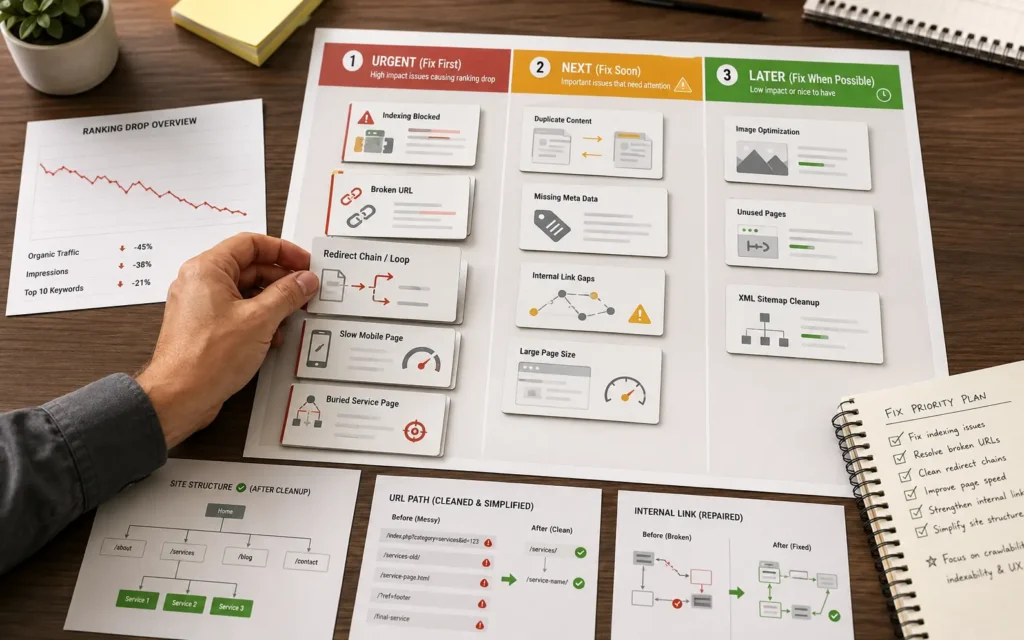
The final list should be sorted by impact:
- Problems blocking crawl or indexing
- Problems hurting important pages
- Problems affecting mobile users
- Problems wasting internal links
- Content issues that still need review
That order saves time.
If Google can’t access the page properly, fix that first. If the page loads badly on mobile, handle that before adding new sections. If old links are pointing at dead pages, clean the path before publishing more articles.
Content still matters. Of course it does.
But after a ranking drop, the smartest move is to check the technical base before blaming the writer, the keyword, or the latest Google update. A clean audit won’t promise rankings back. It will show you what’s broken, what’s weak, and what deserves attention first.
FAQs
How do I know if a ranking drop is technical?
Start with Search Console. If important pages lost position, disappeared from queries, or show indexing changes, a technical issue may be involved. If only impressions changed but position stayed close, the cause may be search demand or query mix instead.
Should I update content before doing a technical audit?
Not first. Check indexing, crawl access, redirects, canonicals, mobile speed, and internal links before rewriting the page. If the page has a technical problem, new paragraphs won’t fix the main issue.
How long does a technical SEO audit take?
For a small business website, the first useful findings can often be found quickly. A deeper audit takes more time because it checks page types, templates, internal links, redirects, speed issues, and Search Console patterns together.
