
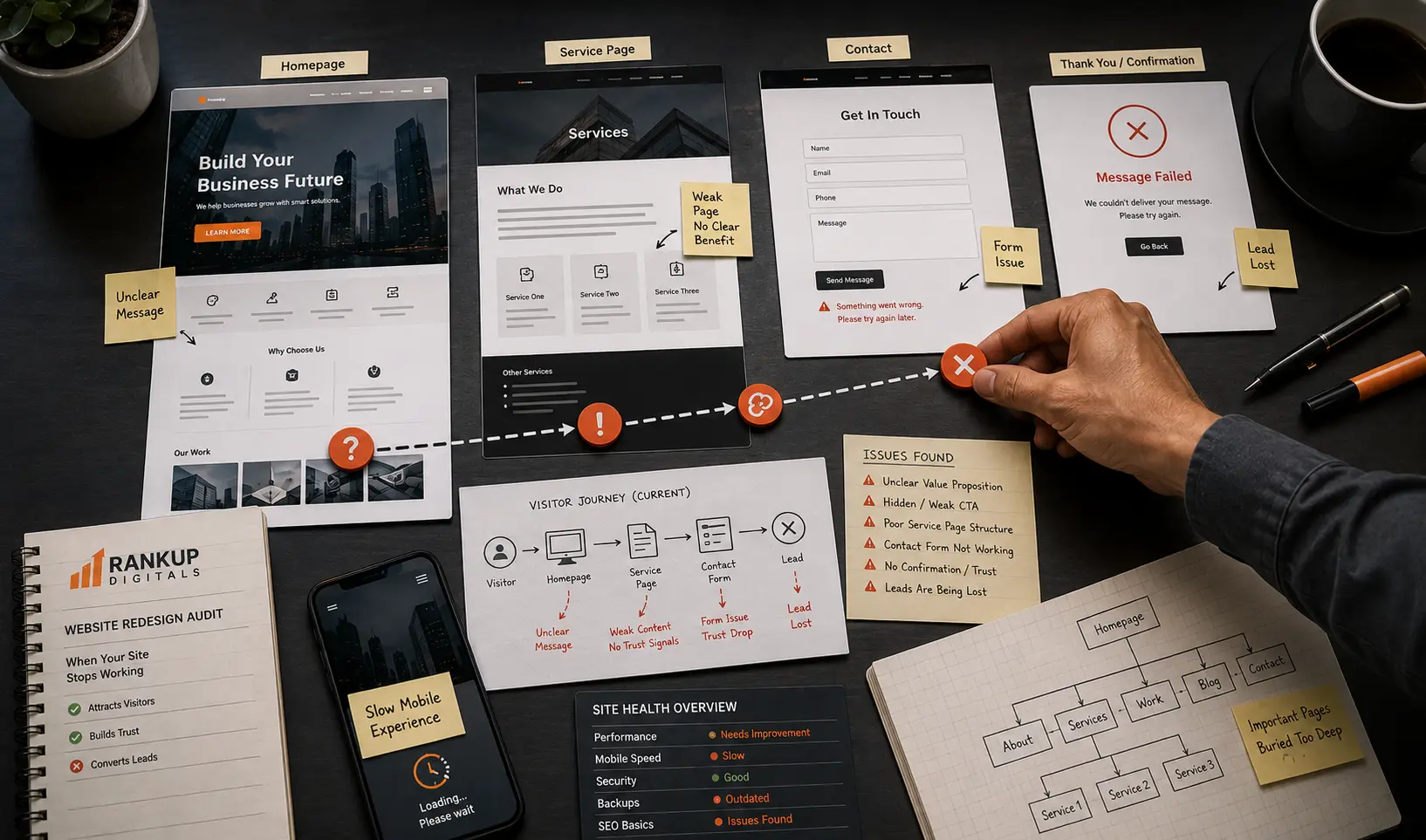
We once reviewed a service business website that looked fine at first glance.
Clean logo. Nice hero image. Menu working. Contact page live.
But after ten minutes on the site, the problem was obvious. The homepage didn’t say who the service was really for. The main offer was hidden halfway down the page. The contact button looked like a normal text link. On mobile, the form felt cramped and slow.
The owner didn’t need a prettier website.
He needed a website that helped people understand, trust, and contact the business faster. That’s the real reason website redesign services become worth considering.
Old design is not always the main problem
Some websites look dated, yes.
But many redesign projects start for the wrong reason. The owner says, “Our site looks old,” while the bigger issue is usually buried in the page flow.
Weak headline. Confusing services. Too many menu items. No proof near the offer. A contact form that feels like work. Pages that were written years ago and no longer match what the business sells.
A new color scheme won’t fix that.
Before redesigning anything, I’d ask one simple question: where is the website losing the visitor?
A working website has to guide people
A business website has a job.
It should help a visitor land on the page, understand the offer, feel some trust, and know what to do next. Sounds basic, but many websites fail right there.
The page opens, but the message is vague.
The service is useful, but the proof is missing.
The visitor is interested, but the next step is unclear.
That’s when redesign becomes more than a visual update. It becomes a repair job for the whole path from visitor to enquiry.
What I’d fix before touching the colors
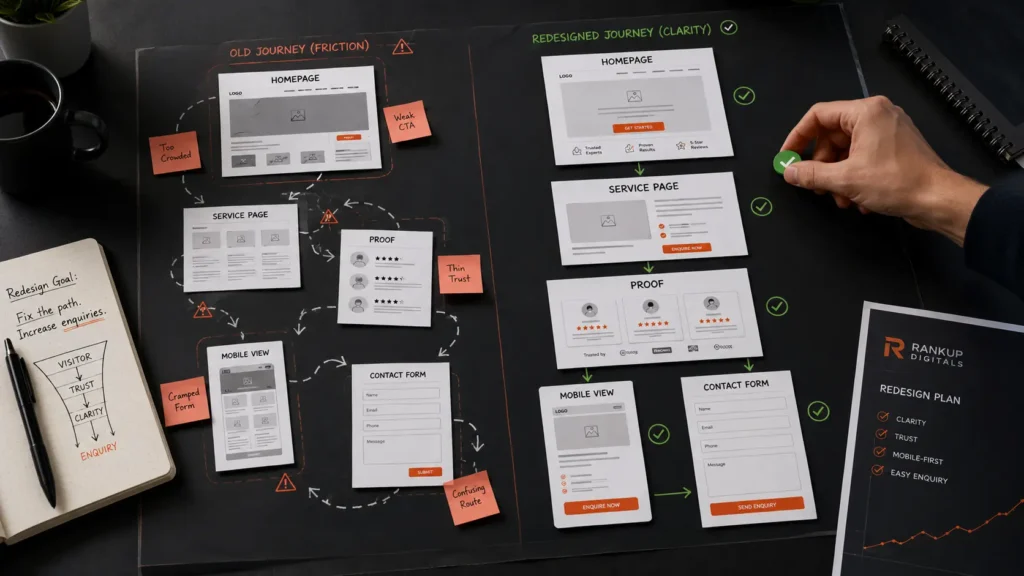
Before design, I’d walk through the site like a buyer.
Not like a designer.
Can I understand the offer without scrolling too much? Is the main service clear? Is there proof near the claim? Can I contact the business without hunting for a button? Does the mobile page feel easy, or does it make me work?
If these parts are weak, new colors won’t save the website.
| What feels broken | What I’d change |
| Homepage is vague | Say clearly who the business helps and what they offer |
| Service pages feel thin | Add stronger structure, proof, and next steps |
| Mobile page feels awkward | Fix spacing, buttons, form layout, and load weight |
| Menu is crowded | Keep the important pages easy to reach |
| Old pages still rank | Map URLs before removing or changing anything |
A redesign should make the site easier to use.
Simple test: if a visitor has to think too much, the page is still not doing its job.
Don’t lose SEO during the rebuild
This part gets ignored too often.
A site gets redesigned, then old URLs disappear. Service names change. Good content gets removed because it didn’t “look modern.” Internal links break. After launch, traffic drops and nobody knows which change caused it.
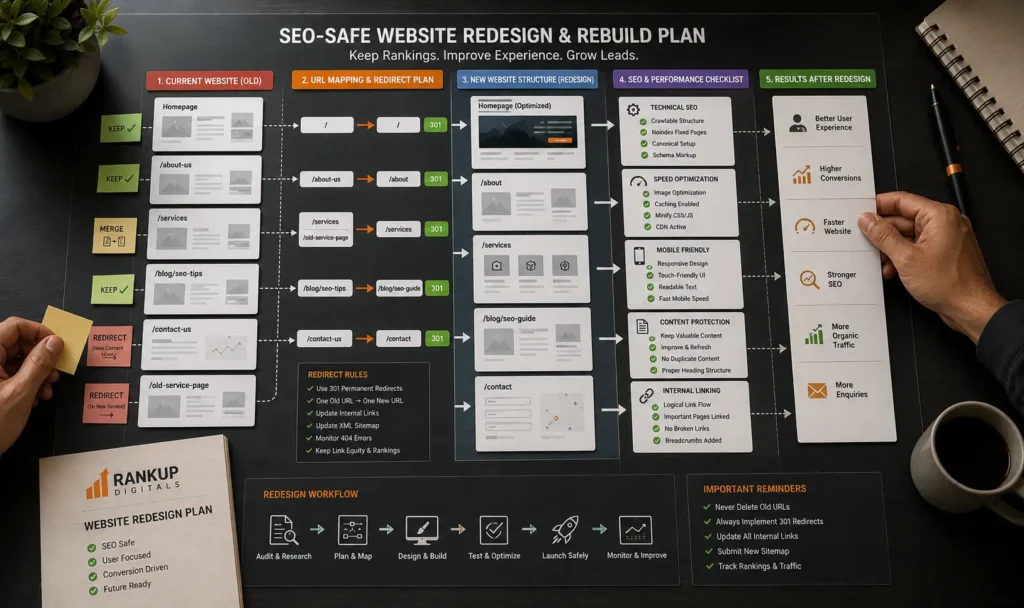
So before rebuilding, I’d make a URL map.
Old page. New page. Keep, merge, redirect, or remove.
Google’s guide on site moves with URL changes is worth checking if important URLs are changing during a redesign.
For service businesses, this is also why design and SEO can’t be separated. A nice page that loses useful content, rankings, or internal links is not a better page. Our business website design guide goes deeper into that buyer path side.
A redesign should not make the site heavier
I’ve seen redesigned websites become slower than the old version.
Large hero images. Sliders. Extra animations. Too many sections. Plugins added for small effects nobody really needed.
Looks better in a screenshot.
Feels worse on a phone.
Speed should be checked while the redesign is happening, not after launch. Google’s Core Web Vitals documentation is useful for understanding loading, interaction, and visual stability.
For WordPress sites, the build matters a lot. Clean templates, lighter layouts, and fewer unnecessary parts usually beat a heavy design with fancy effects. That’s the kind of work our WordPress development service is meant to support.
When the Redesign Is Worth Doing
After checking the buyer path, SEO risk, speed, and mobile layout, the decision gets clearer.
I wouldn’t rebuild a full website just because one page feels weak.
Sometimes the right fix is smaller. Rewrite the main service page. Clean up the contact section. Make mobile buttons easier to tap. Compress heavy images. Fix the menu so people stop getting lost.
That kind of work can be enough.
But if the whole site keeps fighting the visitor, a small patch won’t change much.
The homepage doesn’t explain the offer clearly. The service pages feel thin. The mobile version feels clumsy. The site loads slowly. Good pages exist, but they don’t connect well. The contact path feels hidden.
At that point, the website is not just outdated.
It is making buyers work too hard.
That’s when a redesign is worth taking seriously. Not because the business needs a fresh look, but because the website needs a better path from first visit to enquiry.
A proper redesign should make the offer easier to understand, keep useful SEO pages safe, improve slow parts of the site, and make the next step obvious. If cost is the concern, our guide on website design packages explains why some projects stay small while others need deeper work.
The final test is simple.
Can a serious visitor understand the business faster than before?
If yes, the redesign has a real purpose.
If no, it’s just a cleaner version of the same problem.
FAQs
When should a business redesign its website?
When the site is still live, but it no longer helps people understand the offer, trust the business, or contact you easily. Age alone is not enough. Poor mobile layout, unclear service pages, slow loading, and low enquiries are stronger signs.
Should I redesign the full website or fix a few pages first?
Fix the weakest pages first if the problem is limited. A full redesign makes more sense when the same issues appear across the homepage, service pages, navigation, mobile experience, and contact path.
Can a website redesign hurt SEO?
Yes. It can hurt SEO if old URLs are removed, redirects are missed, useful content is cut, or internal links break during the rebuild. Before launch, important pages should be mapped and checked properly.
What should website redesign services include?
They should include message review, page structure, mobile layout, speed checks, form testing, SEO-safe redirects, internal linking, and a clearer path from visitor to enquiry. The goal is not just a nicer design. The goal is a website that helps the business work better.
